01
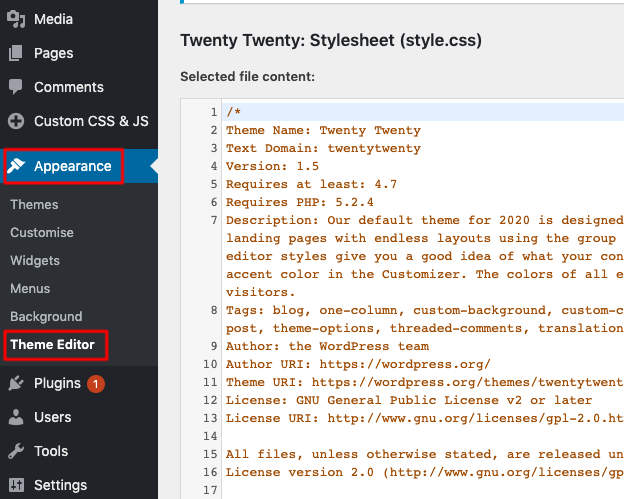
Open the theme file editor
Log in to your WordPress admin, hover over "Appearance" and click "Theme File Editor". On older WordPress versions this is called "Theme Editor". If you prefer not to edit theme files, any "insert headers and footers" plugin works too: paste the badge code into its body-end section and skip to the last step.
02
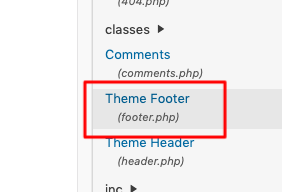
Select the theme footer
In the file list on the right, select the "Theme Footer" file (footer.php).
03
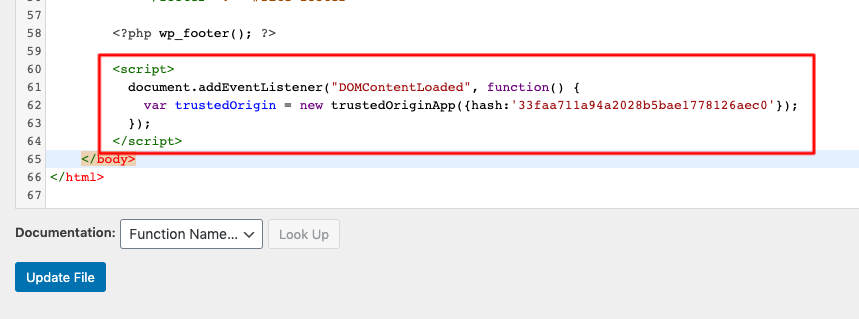
Paste the badge code
Paste your badge code from the dashboard just before the closing body tag, then click "Update File".
04
Check your site
Open your website in a new tab. The Trust Badge should appear near the bottom of the page. If you use a caching plugin, purge the cache first.
Badge not showing?
- If your site uses a caching system or CDN, purge the cache after adding the code.
- Make sure the code sits before the closing body tag and was not altered by an editor.
- Confirm your subscription is active for this domain in your dashboard.
Still stuck? Email us and a human will help.